
XGOLF24
한국어English中文日本語Bahasa Indonesia
WITH X-PRIZENight-time bay · 1 / 4
Space concept

XGOLF24 · 24/7 SELF-SERVICE SCREEN GOLF

From booking to entry.
Every step, connected automatically.

From booking and payment to mobile entry, equipment control, and oversight.
The guest journey and venue operations flow together.

  1. 01Booking & payment
  2. 02Mobile entry
  3. 03Automation
  4. 04Management
PLAY ANYTIME. RUN SIMPLY.FROM BOOKING TO PLAY

APARTMENT COMMUNITY

A premium golf lounge,
right in your community.

A place for golf, relaxation and time with neighbors.
Explore installations, technology, activities and operations.

Explore apartment communities Full proposal and tailored installation consultation · Korean
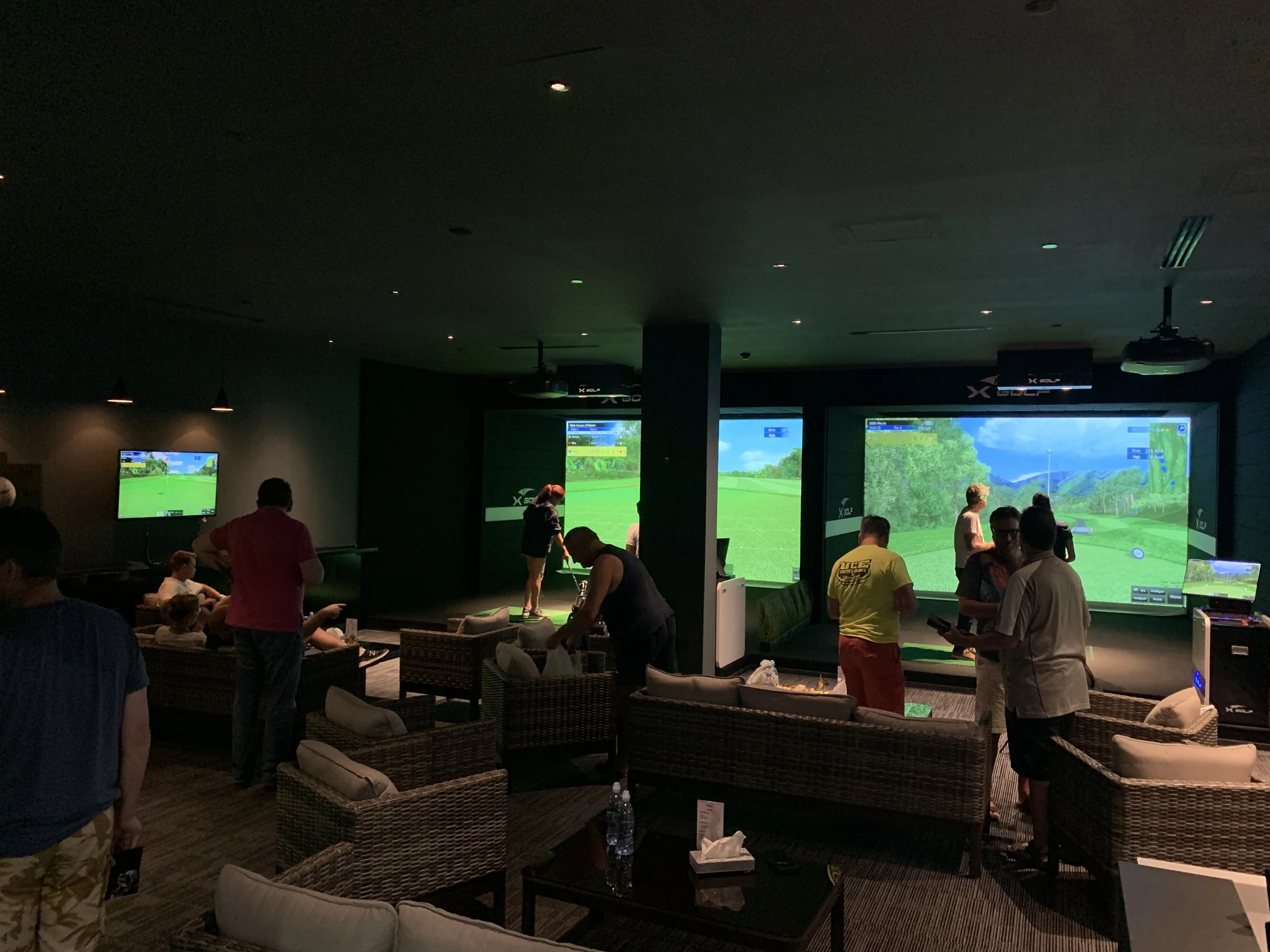
A real XGOLF installation with golf bays and a shared sofa lounge

EXPLORE THE SPACE

Step inside.
Explore the connections.

Select an equipment location.
From entry and play to the table experience,
see how the space connects.

Private roomSelect a point to explore
With X-PRIZE · Space concept. Equipment appearance and placement vary with the installation.
SPACE GUIDE

01 / MOBILE ENTRY

At your booked time,
enter with your mobile key.

The terminal beside the door supports mobile entry, connecting a customer booking with access to the venue.

Entry integration depends on supported devices and on-site configuration.

See the mobile journey
01 / CONNECTED OPERATION

One booking.
Your venue gets ready.

Prepare the venue around each booking.
See what needs your attention.
Review the details and take the next step.

RESERVATIONBooking & payment

Every session starts with a confirmed booking.

READY TO PLAYAccess, climate & power

Entry and equipment ready for the session.

AFTER PLAYSession end & tidy-up

Control equipment and prepare for the next player.

XGOLF OPERATIONS
01. Find venues that need attention.

Start with unresolved alerts and offline venues. This example shows a PC connection alert at the Daejeon venue.

Monitor and act in one place, even while automation runs.
Spend less time switching screens to check your venues.

English product UI with sample data. Automation requires compatible equipment, payment integration and on-site configuration.
Cleaning, equipment inspections and other physical upkeep still require on-site care.

Explore the daily routine

DAILY VENUE OPERATIONS

A day in venue operations.
Know what to check.

Review bookings, revenue and connections on screen.
Respond to entry issues and tidy-up alerts.
Combine this with on-site care to prepare for the next session.

THE CONNECTED BUSINESS

One connected journey for players and operators.

Clear responsibilities,
within one connected operation.

Player journey

01 / PLAYER
  1. Booking & paymentChoose a time and pay
  2. Mobile keyMobile entry for your booking
  3. Play & tidy upConfirm tidy-up after play
CONNECTED OPERATIONSXGOLF24

Connecting booking, entry and operations

Access & equipment

02 / ON-SITE
  • Door accessEntry linked to the booking
  • ClimatePreparation for each session
  • PowerPower control for supported equipment
Check on screen
Bookings · Revenue · Payments · Connections · Alerts
Review status and take authorized action
Care on site
Cleaning · Supplies · Equipment checks
On-site care for the next session
Equipment integration and remote control depend on supported devices, site configuration and account permissions.

THREE MOMENTS OF OPERATION

  1. Before play

    Check the schedule
    and venue status.

    • Review today's bookings, upcoming sessions and bay occupancy
    • Check venue PC and access-device connections and alerts
    • Inspect bays and shared spaces on site
  2. During play

    When an issue arises,
    take the next step.

    • Review payment or entry issues and customer help requests
    • Check bookings, mobile keys and equipment status to identify the cause
    • Authorized staff review the impact and reason before taking remote action
  3. After play

    Check the tidy-up status.
    Prepare for the next session.

    • Review self-clean status and cleaning alerts
    • Clean on site, replenish supplies and inspect equipment
    • Review action results and outstanding items

02 / THE EXPERIENCE

Less to do.
More time to play.

Pick a time, pay and enter with your mobile key.
Each step connects directly to venue operations.

01 Booking & payment02 Mobile entry03 Play & extend04 Tidy up & earn

English product UI. Venues, people and prices are sample data.
Features and availability may vary by venue.

YOUR GOLF, IN YOUR HAND.
Tap a screen to enlarge
USER MANUAL

From play to operations and setup, step by step.

Guest booking and entry, the operator console, store opening and installation, and common fixes — shown on the real screens.

Open the manual
PLAY & STAYYour time to play. Your space to unwind.
With X-PRIZE · Space concept

XGOLF24 / THE TECHNOLOGY

XGOLF BLACK.

See every detail.
Even at impact.

High-speed capture
1,440FPS
Native resolution per camera
2048 × 1024PIXELS
Precision from two angles
DUALCAMERA
XBIRDIE SCOPE / IMPACT ANALYSIS

Real analysis footage · 10-second preview
Measurements shown are from an example shot.

03 / POWERED BY XGOLF

Simpler operations.
Precision golf.

XGOLF technology at the heart of every self-service space.
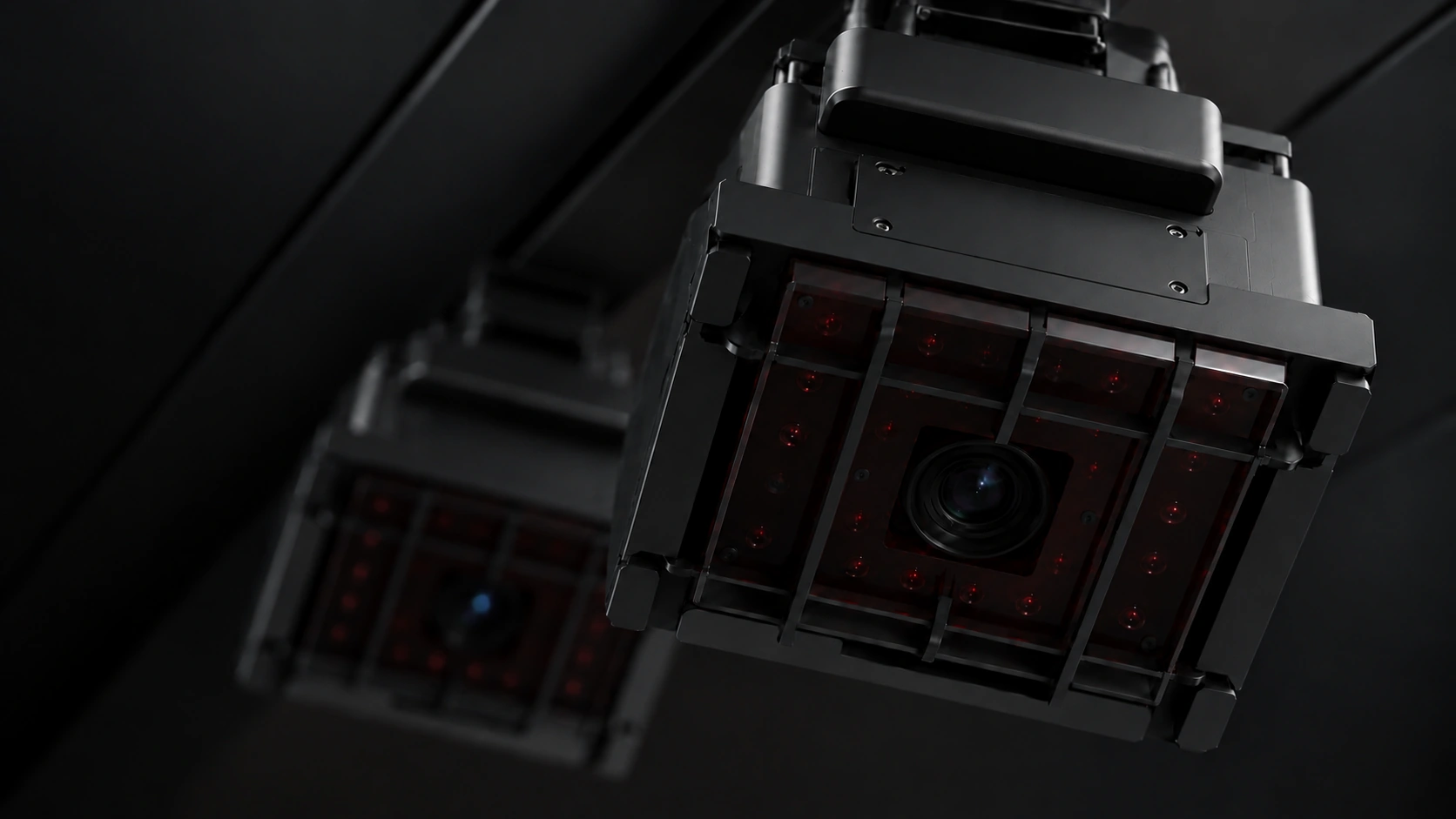
Ceiling-mounted dual smart cameras
capture the fine details of impact.

Product rendering of the ceiling-mounted XGOLF BLACK dual smart camera
DUAL SMART CAMERA

XGOLF
BLACK.

Product rendering · Final appearance may vary
1,440FPS

Capture the split second of impact

2048 × 1024

High-resolution capture from each camera

DUALCAMERA

Track the ball from two angles

Explore BLACK on the main site

Specifications published on the main site as of September 2026. Confirm final supply specifications and installation requirements during consultation. Demo measurements are from example shots.

04 / MORE REASONS TO PLAY

Beyond practice.
More reasons to return.

Learn, take on challenges and earn rewards.
Connected self-service golf brings
more ways to enjoy every visit.

01 / PRO LESSON

Pro lessons.
On your schedule.

Choose an available time and book your lesson and bay together. Pros manage schedules and student history, while venues track bookings and settlements.

  • Book your lesson and bay in one flow
  • Manage each pro's schedule and students
  • Track package usage and settlements

English product UI. Pros, venues and prices are sample data.
Payment, notifications and other integrations depend on the service configuration.

Pro lesson booking
With X-PRIZE · Space concept ⤢
02 / X-PRIZE

One more challenge.
Rewards worth playing for.

X-PRIZE connects golf challenges with rewards.
Scan the tablet's QR code and choose a challenge. We are developing an experience that turns your game results into rewards.

Game-result and X-PRIZE integration in development

05 / PLAN YOUR SPACE

Plan the setup
for your space.

Start with booking, entry and management.
Then review site connections and optional features.
We help you plan around your space and operation.

01 / CORE OPERATION

Core operation

Connect the player journey with day-to-day venue management.

  • Booking schedules, pricing and mobile payment
  • Mobile keys and session time management
  • Booking, revenue and venue status overview
02 / ON-SITE CONNECTIONS

Site connections

Choose the connections that work with your facilities and supported equipment.

  • Door lock and gateway for mobile entry
  • Climate, lighting and power control
  • Venue PC and CCTV connected to the operations screen
03 / OPTIONAL EXPERIENCES

Optional experiences

Consider lessons and rewards that fit your venue.

  • Pro lessonsAvailability depends on payment and notification integrations.
  • X-PRIZEGame result and reward locker integration in development
Explore optional features

What to check before installation

Photos and a floor plan help us
review the bay layout and site connections.

Space and bay layout
Check the width, depth, swing clearance and waiting areas. Review the layout for your bay count and right- or left-handed play.
Ceiling and equipment mounting
Measure clear height below beams, pipes and finishes. Check the location and fixing structure for ceiling-mounted equipment.
Door and mobile entry
Check the independent entrance and whether a compatible door lock can be fitted. Review power and connectivity for the gateway near the door.
Electrical supply and outlets
Check power and outlets for golf equipment, the venue PC and control devices. Review whether supply upgrades or wiring work are needed.
Internet and connectivity
Check the internet connection and a wired link to the venue PC. Review network coverage for the router, entry and control devices, and CCTV.
Climate and site conditions
Check heating and cooling, the outdoor unit location and sound insulation needs. Review which existing facilities can be connected.

Required dimensions and installation methods depend on the model, handedness and site measurements. Confirm the final equipment, integrations and installation work during consultation.

Discuss your space

BEFORE YOU START

Your questions.
Answered.

What can be automated?

Booking and payment connect to mobile key issuance, timed access and compatible equipment controls. Climate, lighting and power automation depend on supported equipment and on-site configuration.

What does the operator manage?

Operators review bookings, revenue, venue connections and exceptions such as payment or entry issues and tidy-up checks. Cleaning, restocking and equipment inspections still require on-site care.

Can I add it to an existing venue?

We first review your space, golf equipment, doors, power and network setup. Share your existing configuration so we can discuss compatible integrations and installation requirements.

Are pro lessons and X-PRIZE available now?

Pro lessons are shown using the current booking and management UI; availability depends on payment and notification integrations. The X-PRIZE demo UI is ready, while game-result and reward-locker integration is in development.

YOUR NEXT GOLF SPACE

Your space.
Your XGOLF24.

Tell us about your space.
Let’s find the right way to run it.

  1. 01Send your inquiry
  2. 02Our team reviews it
  3. 03Discuss your space and setup

Our team will follow up using your contact details.

LET’S TALK

Planning a new venue?

Share what you know so far. * Required

Consultation typeOpening a new venue

How we use your information

Collected by XGOLF to respond to your inquiry: your name, phone number and any email, company, installation details and message you provide.

Retention: one year from submission. You may decline consent, but we cannot accept an online inquiry without it.

Your inquiry will be received by the XGOLF headquarters team.

XGOLF24Talk to us ↗